 Sinatra is a library that makes web application and we are going to look at how the folders/files are assembled.
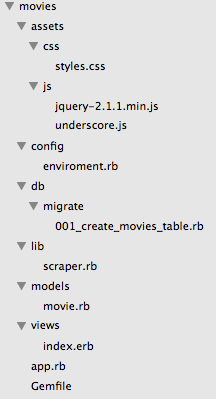
- All of our files for our application are in the ‘movies’ folder
- ‘assets’ holds all of our files that work with visual aspects from our ‘views’ folder. CSS and JavaScript are here each in their own folder.
- ‘config’ holds the ‘environment.rb’ file. This file sets up our connection to our database. In this example we are going to be working with ActiveRecord.
- ‘db’ holds our ‘migration’ folder which will hold all our migration files. Migrations are how we edit our database. This is going to be where we create our table that will hold data.
- ‘lib’ will hold all our the helper files for our application.
- ‘models’ folder is where we have a ‘movie.rb’ file. This name for this file should be singular and should represent the data that you are working with. I choose the name ‘movie’ because that is the information we are going to be working with.
- ‘views’ this is where all the files are going to go that the user will be able to see. In this folder we see an ‘index.erb’ file which stands for ’embedded Ruby’. This is going to be an HTML5 document with Ruby code to make our pages dynamic.
- ‘app.rb’ file is where you are going to have all the routes for the application. All the GET and POST requests will be placed in here. This file determines what the user will see when they go to a URL.
- ‘Gemfile’ is a file that we are going to require all our gems for the entire application. This is going to let us require all the gems in one file rather than having to require all the gems in multiple files.
Now that we have the file structure for our application how do these files communicate with each other? Before the app gets run, we have to do is set up our database. This is done through migrations, which we have in the ‘db/migrate’ directory. Inside this directory is our ‘001_create_movies_table.rb’ file. (Note: it is important that you label your migration files numerically because they will be run in numeric order.)
class CreateMoviesTable < ActiveRecord::Migration

def change
     create_table :movies do |t|
          t.string :name
          t.string :date
          t.text :description
     end
end

end
Now we are going to look at the ‘lib’ directory, which holds files that will be helpful to your application. Inside our ‘lib’ directory we are going to run our scraper file. This is going to gather all the data for our application and store it in the database. When the user goes to view our application the data that we gathered and stored in the database is now going to be able to view.
After the ‘scraper.rb’ file is run we will look at the ‘app.rb’ file, found in the main directory. In this file we will see all of the routes for the application.
Here is what our ‘app.rb’ file looks like:
require '.config/environment'

class MovieApplication < Sinatra::Base
register Sinatra::Reloader
register Sinatra::ActiveRecordExtension

set :public_folder, "#{__dir__}/assests"

get '/' do
@movies = Movie.all
erb :index
end

get '/movies.json' do
content_type "text/json"
Movie.all.to_json
end

get '/movie/:id.json' do
content_type "text/json"
Movie.find(params["id"]).to_json
end

run!

end
We also see at the top of the ‘app.rb’ file that it is requiring ‘.config/environment’. We can find the ‘environment.rb’ in the ‘config’ directory. Here we are requiring ‘bundler’ which will give us the correct version of the gems that we are using in the application. In this file we are also establishing our connection to the server. For this app we are using SQLite and we are calling our database ‘scraped_movies’. At the bottom of this file we are requiring all of our ‘models’ and everything in our ‘lib’ directory. This file is going to require our ‘bundler’ and establish the connection to the database for our app. Below is an example of the ‘environment.rb’ file:
require 'bundler'

Bundler.require :default

ActiveRecord::Base.establish_connection(
adapter: "sqlite3",
database: "db/scraped_movies")

require_all "models"
require_all "lib"
At the bottom of our ‘environment.rb’ file we can see that it is requiring all of our ‘models’ and everything in our ‘lib’ directory. The models directory is where we create classes for the data that we are working with. The classes will inherit from ‘ActiveRecord::Base’. It is here that we are able to validate if data is being passed into the database as the correct datatype. We can also specify relationships between models. For example if we wanted to have a relationship between movies and actors we could write the following:
class Movie < ActiveRecord::Base

has_many :actors

end
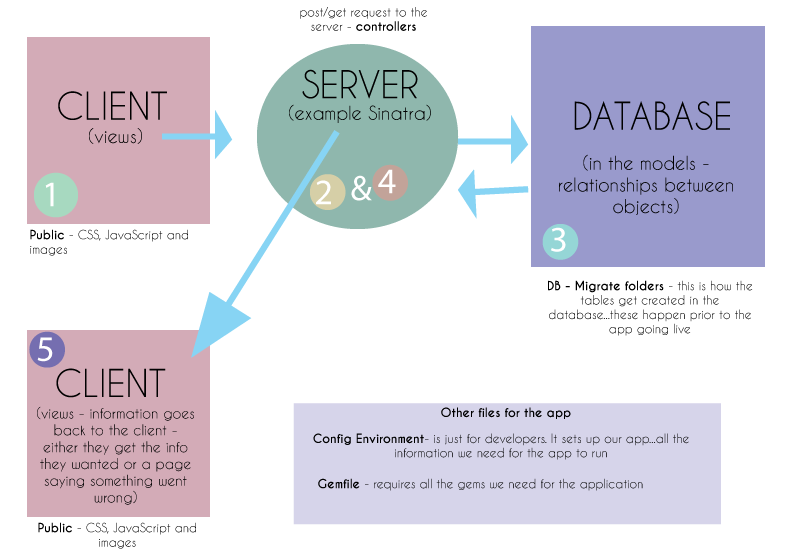
Now if the user were to go to the route we have created in our ‘app.rb’ they will be able to see our page! If the first URL they visit is with our route ‘/’ the user is going to see our ‘index.erb’ file. This file is found in our ‘views’ folder. Once this file is loaded it is also going to load the CSS and the JavaScript files that are linked to that page. The CSS and JavaScript files can be found in the ‘assests/ccs’ and ‘assests/js’ directories. Here is an illustration I drew that illustrates what is happening above:
 She learns to code in Brooklyn