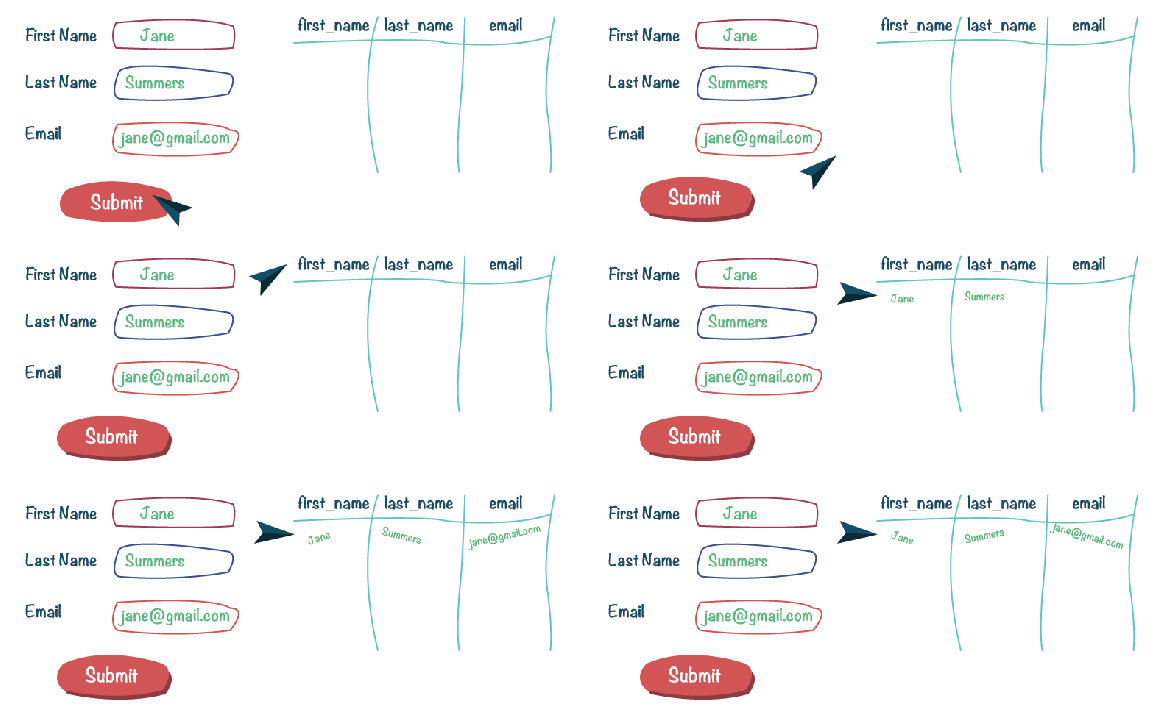
Most websites will have forms on them. From asking a user to login to having a user sign up for a mass email. How does the information a user enter on your website get stored so you can access the user’s information later?
First we need to build a form for the user to input their information.
<form method="post" action="email.php">
     <div class="formRow">
          <label for="first_name">First Name:</label>
          <input type="text" name="first_name">
     </div>

     <div class="formRow">
          <label for="last_name">Last Name:</label>
          <input type="text" name="last_name">
     </div>

     <div class="formRow">
          <label for="email">Email Address:</label>
          <input type="email" name="email">
     </div>

     <div class="formRow">
          <input class="btn btn-primary" type="submit" value="Submit">
     </div>
</form>
Above we are using the HTML <form></form> element. This element has two attributes, the “method” and “action” attributes. The “method” attribute here is set to “post” which means that we want to send the data we receive from the user through an HTTP request to our database. The next attribute on this form is the “action” attribute. The “action” attribute specifies where the data should be sent when the user hits submit. Here we want the data from the form to be sent to a php file called “email.php”. The “email.php” file will have all the code we need to connect to our database and process the form data.
Inside our we have two more HTML form elements. The first element is the <label></label> element. This is used as a label for out next element, the <input> element. The way that the <label></label> element knows which <input> it is associated with is by the “for” attribute. Now when we look at our <input> element we notice that there is an attribute called “name” which is set to the same value as the “for” attribute in the <label></label> element. The element also has a “type” attribute. This attribute is going to specify what kind of input the user is allowed to put into the input field.
<label for="first_name">First Name:</label>
<input type="text" name="first_name">
In our HTML form example for “first_name” we set “type” to equal “text”. This means that the user must enter text into this input field. The other input values for “type” are: button, checkbox, color, date, datetime-local, email, file, hidden, image, month, number, password, radio, range, reset, search, submit, tel, text, time, url and week.
There are two more input fields in our form that accept user data, the “last_name” and “email” input fields. Those are just about the same as the “first_name” field so lets skip down to the bottom of our form and look at the “submit” input. Notice that this input does not have a label. This doesn’t need a label, because the “value” attribute on this input field will be printed to the screen. For example here the user will see the text “Submit”. When the user hits the “submit” input field this will send the user to the “email.php” file which we specified up at the top of form as our action.
<?php $servername = "localhost"; $username = "root"; $password = ""; $dbname = "useremails"; $first_name = $_POST['first_name']; $last_name = $_POST['last_name']; $email = $_POST['email']; // Create connection $conn = new mysqli($servername, $username, $password, $dbname); // Check connection if ($conn->connect_error) {
	    die("Connection failed: " . $conn->connect_error);
	}

	$sql = "INSERT INTO orders (first_name, last_name, email)
	VALUES ('$first_name', '$last_name', '$shipping_address', '$email')";

	if ($conn->query($sql) === TRUE) {
	    echo "New record created successfully";
	} else {
	    echo "Error: " . $sql . "
" . $conn->error;
	}

	$conn->close();
?>
In the code above we are now processing the data that the user has submitted and placing that data into our database.
$servername = "localhost";
$username = "root";
$password = "";
$dbname = "useremails";
These four php variables are set to equal all the information we need to access our database. We define our server’s name as “localhost”, our user name to “root”, our password as an empty string, and lastly we define our database name to “useremails”.
* Note: You will have to change these variables to your own credentials for your database.
$first_name = $_POST['first_name'];
$last_name = $_POST['last_name'];
$email = $_POST['email'];
Now we take the input that the user entered into the form and save those inputs as php variables. We set our form method to “post” which sent the data and now in php we are able to access that data through php’s predefined variable “$_POST”. “$_POST” saves the user’s data into an object. We can access the values that the users have entered by using our input field’s “name” value as the keys ($_POST[‘first_name’]).
$conn = new mysqli($servername, $username, $password, $dbname);
// Check connection
if ($conn->connect_error) {
     die("Connection failed: " . $conn->connect_error);
}
The next block of code is how we connect to our database. “new mysqli()” is how we open a new connection and the four arguments that it takes is our information for our database. Then we check to see if there was an error connecting to the database and if there was we want the process of trying to connect to end.
$sql = "INSERT INTO emails (first_name, last_name, email)
VALUES ('$first_name', '$last_name', '$email')";
Once our connection to our database is established we are able to add the user data into our database. This is done by writing an SQL query to the data. Above we are saying that we want to “INSERT INTO” our “emails” table the three values “$first_name”, “$last_name” and “$email” into our table with the column names of “first_name”, “last_name” and “email”.
if ($conn->query($sql) === TRUE) {
     echo "New record created successfully";
} else {
     echo "Error: " . $sql . " " . $conn->error;
}

$conn->close();
Our last step is to see if our data was successfully submitted to the database. If “$conn->query($sql) === TRUE” evaluates to true then we print “New record created successfully” to the screen and if not then we will print an error to the screen. After we see if our data was saved correctly or not the connection to the database is closed.













 She learns to code in Brooklyn