A “for loop” is going to allow you to run a block of code a specific number of times. Let’s say that you wanted to run a method a certain number of times, without using a “for loop” you would have to write the method multiple times. You would not want to do that, because it is not making your code very DRY (short for don’t repeat yourself). If you use a “for loop” you would be able to specify how many times you want the method to run.
Here is an example of a “for loop”, printing the numbers 10 – 20 to the screen:
for(var i = 10; i < 21; i++) {
     console.log(i);
}
If you did not use a loop here is what the code would look like:
console.log(10);

console.log(11);

console.log(12);

console.log(13);

console.log(14);

console.log(15);

console.log(16);

console.log(17);

console.log(18);

console.log(19);

console.log(20);
The “for loop” is saving us from doing a lot of writing! How is the “for loop” doing this? We have the “for” keyword which tells us that this is a “for loop” in JavaScript. Next we see are parentheses which hold three different sets of code. Let’s look at each set of code in the parentheses:
- var i = 10
- Here we have the var keyword, which is how we identify variables. After the var keyword we have the name of our variable, ‘i’. You are able to name the variable anything you would like. This variable is set to equal 10. This number can be set to any number you would like. Think of this as your starting point, where do you want the counting to begin.
- i < 21
- This is how the “for loop” is going to know when to stop. As long as ‘i’ is less than 21 the loop is going to continue to run. Once ‘i’ is no longer greater than 21 the loop is going to stop. This can be thought of as the end point. We know that the loop is going to end at 20, because 20 is the last number that ‘i’ is going to be less than 21.
- i++
- This looks confusing, but this is really just short hand for the following:
- i = i + 1
- This is how we want to increment our count. Once the value of ‘i’ equals 20 the loop is going to stop.
- { }
- These curly braces are very common in JavaScript. Here they are going to hold all the code that we want to run inside our “for loop”.
- console.log(i);
- This is how we see the value of ‘i’ printed to the screen as the loop is running.
What if we wanted to count down from 20 to 10?
for(var i = 20; i > 9; i--) {
     console.log(i);
}
We have our variable (var) set to our starting point (20). Next we are saying when we want the loop to stop. As soon as ‘i’ is no longer greater than 9 the loop will stop. The last thing we see is how to decrease the numbers by one. Before we saw the shorthand for increasing numbers by one (i++), here we see how to decrease numbers by one (i- -).
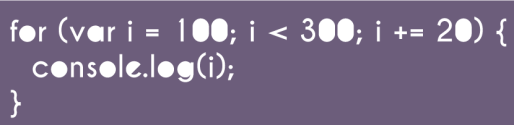
What if you don’t want to increment the count by one, but by a larger number? Here how to increment the loop by 20.
for(var i = 100; i < 220; i += 20) {
     console.log(i);
}
Above we have our “for loop” set up the same as the first example except for how the loop increments. Every time the loop is run ‘i’ is going to have 20 added to it instead of 1. This “i += 20” is short hand for “i = i + 20”. Here the loop is going to stop running when ‘i’ is no longer less than 220. Since we are adding 20 every time the loop goes through the last number that is going to be printed to the screen is going to be 200.



 She learns to code in Brooklyn