
In order to get access to data that is stored in a database, we need to be able to communicate with the database. Data is stored in the database in tables. The way that you retrieve, change, create, or delete data can be done through SQL. A great way to organize data is often splitting up data into categories and then putting each category into its own table. Once each category has its own table, then you can “link” each table together in a separate table.
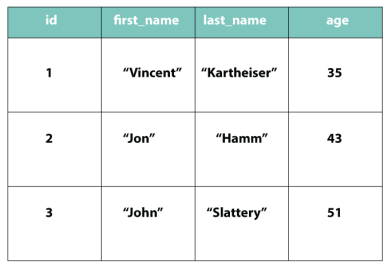
Here we are going to create one table for actors and one table for movies. By creating individual tables instead of one big table, our information will be more organized. We can create a third table that will link the actor to the movie that they were in.
First lets create the actors table:
CREATE TABLE actors (

id SERIAL PRIMARY KEY,

first_name TEXT,

last_name TEXT,

age INTEGER

);
- “CREATE TABLE” is a key phrase that will allow us to make our table.
- “actors” is going to be the name of our table
- Everything in between the parentheses will be information for our table. When we set up the table we are going to set up all the columns. Above we have all the column names and we are specifying what kind of data the column will have.
- ” id SERIAL PRIMARY KEY” – This is going to create an id column that will have a datatype of “SERIAL PRIMARY KEY”. This data type means that the id column is going to have an auto generated id number. You will not have to manually enter in an id number every time you create a new actor.
- “first_name” and “last_name” – These are going to be text columns.
- “age” – This column will hold only numbers.
Next lets add some information to the table we just created.
INSERT INTO actors (first_name, last_name, age)
     VALUES ('Vincent', 'Kartheiser', 35);
INSERT INTO actors (first_name, last_name, age)
     VALUES ('Jon', 'Hamm', 43);
INSERT INTO actors (first_name, last_name, age)
     VALUES ('John', 'Slattery', 51);
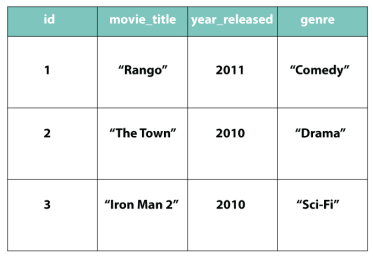
Now lets make a table for “movies”:
CREATE TABLE movies (

id SERIAL PRIMARY KEY,

movie_title TEXT,

year_released INTEGER,

genre TEXT

);
Then we add all the information:
INSERT INTO movies (movie_title, year_released, genre)
     VALUES ('Rango', 2011, 'Comedy');
INSERT INTO movies (movie_title, year_released, genre)
     VALUES ('The Town', 2010, 'Drama');
INSERT INTO movies (movie_title, year_released, genre)
     VALUES ('Iron Man 2', 2010, 'Sci-Fi');
Next we have to create a table that will hold the information we want to have from the two different tables. Below is a table that will link our “actors” table and our “movies” table.
CREATE TABLE actors_movies (
     actors_id INTEGER,
     movies_id INTEGER
);
The last step is to insert the actors id and movies id into the “actors_movies” table.
INSERT INTO actors_movies (actors_id, movies_id) VALUES (1, 1);
INSERT INTO actors_movies (actors_id, movies_id) VALUES (2, 2);
INSERT INTO actors_movies (actors_id, movies_id) VALUES (3, 3);
Above we are linking the two tables together by referencing their id columns.
- INSERT INTO actors_movies (actors_id, movies_id) VALUES (1, 1);
- Our values above are going to be the id number of our actors and the id number of movie that they were in.
The “actors_movies” table will now look like the table below. Now the actors are linked to the movies that they are in.

 She learns to code in Brooklyn