attr_reader, attr_writer, attr_accessor

curtains


In the last post I said I was writing out getter and setter methods the long way, so today I am going to write out the short way!

Here is a class called Movies:


class Movies

def initialize(name, location)
@name = name
@location = location
end

end

  • We have our instance variables all set up! The next thing we want to do is make them accessible outside of the class.
  • What if we ONLY want to be able to read these instance variables, but don’t want to let anyone change their values?
  • You would use attr_reader accessor. The ‘attr’ stands for attribute.

class Movies

attr_reader :name, :location

def initialize(name, location)
@name = name
@location = location
end

end

  • That’s it! Instead of writing out the getter method which would look like this:

class Movies

def initialize(name, location)
@name = name
@location = location
end

def name
@name
end

def location
@location
end 

end

  • This would save us a lot of time if this class had a lot of instance variables that we would want to access. What if we wanted to ONLY be able to change the value of our instance variables? We would use the attr_writer accessor!

class Movies

attr_writer :name, :location

def initialize(name, location)
@name = name
@location = location
end

end

  • This is great if we only want to just read or write to the instance variable, but what if we wanted to do both? It would be a lot of writing if we had to attr_reader and attr_writer for all our instance variables. This is when you would use attr_accessor. This will let you be able to both read or write with your instance variable.

class Movies

attr_accessor :name, :location

def initialize(name, location)
@name = name
@location = location
end

end

  • The code above is equivalent to the following code:
class Movies 

 def initialize(name, location)
 @name = name
 @location = location
 end 

 def name=(name) #this is the setter method
 @name = name
 end

 def name #this is the getter method
 @name
 end

 def location=(location) #this is the setter method
 @location = location
 end

 def location #this is the getter method
 @location
 end

end
  • So rather than writing all these methods out every time you would like to access your instance variables you can now use these attribute accessors!

Getter and setter methods

baseball


Here is how to create “getter” and “setter” methods inside of your class. Why do you need these methods?

  • Lets start with setting up our class.
class Park
end
  • What are some attributes of parks? For this park we want it to have a swing set and a sports court. (It’s going to be an awesome park!)
  • Next we are going to make those attributes our “instance variables” for our park. This means that every time we create a new instance of Park we can change the value of our instance variables!
class Park
 def initialize(swing_set, sport_courts)
 @swing_set = swing_set
 @sport_courts = sport_courts
 end
end
  • Above we are getting our instance variables set up. The “initialize” method is the very first method that is going to be called when write an instance of the class. When we create an instance of the class this is going to set the values to the instance variables. (I will write out creating an instance of the Park class after we set up all our getter and setter methods!)
class Park
 def initialize(swing_set, sport_courts)
 @swing_set = swing_set
 @sport_courts = sport_courts
 end 

 def swing_set
 @swing_set
 end 

 def swing_set=(swing_set)
 @swing_set
 end 

 def sport_courts
 @sport_courts
 end 

 def sport_courts=(sport_courts)
 @sport_courts
 end 

end
  • That is so much code!! Yes, it is a lot and there is a short hand way to write this out, but today we are going to write it out the long way.
  • An example of a “setter” method is on line 11. Here we see “def” which is how we know that it’s method. Then we have the name of the method which is “swing_set” (you can not have spaces in method names). Next we have an equal sign leading to a set of parenthesis with one argument inside it.
  • Inside our method is the instance variable. We can tell it’s an instance variable because of the @ sign.
  • Then this comes to an end with the keyword “end”.
  • An example of the “getter” method is on line 7.
  • The getter method name is “swing_set“. We named it “swing_set” so we know what instance variable the method will be returning.
  • Now let’s create an instance of Park to see why we need all these methods.

great_park = Park.new("blue swing set", "baseball field")

  • “great_park” is going to be the name of the instance that we are going to create. We are setting it equal to a new instance of the Park class (Park.new). Then we are setting the arguments of the initialize method set to: “blue swing set” and “baseball field”.
  • The initialize method sets the instance variables, but what if we wanted to reset the values of those instance variables? This is where the setter method comes in!
  • The setter method is going to let you set a new value to the instance variable. An example: the instance variable “swing_set” is getting set to “blue swing set” because that is what we have passed into the initialize method when we created the new instance of Park. What if we changed our mind and want a “purple swing set”? You would be able to change the value of the instance variable “swing_set” to “purple swing set”!
  • Now that we have gone ahead and set up all our setter methods we want to “get” access to all the variables. This is where the “getter” method comes in.
  • Example: we want to print to the screen that we would like a “blue swing set”. We would write something like this:

puts great_park.swing_set

  • “great_park” is the name of the instance that we have created and then we are attaching the method “swing_set” to it. Since the swing_set method is just returning the value of the instance variable @swing_set that is how “blue swing set” gets printed to the screen.
  • Now if we wanted to go ahead and print out a purple swing set, you could write this…

puts great_park.swing_set=("purple swing set")

Is there a method for that?

method1

There are two types of methods that you can create in Ruby…an “instance” or a “class” method. In this post I am going to talk a little bit about an “instance” method.

  • First lets take a look at what one looks like…

method2

  • Above we have our very first method! Methods in Ruby always start with “def” which stands for “definition” and they are over when you see “end”.
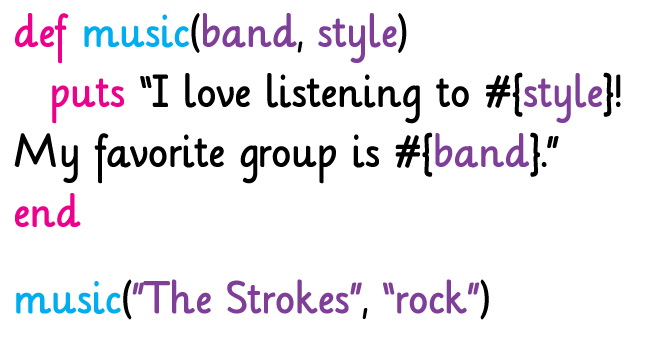
  • Right after “def” you will see the method’s name. Here the method’s name is “music”.
  • What is in those parentheses? Those are known as “arguments” to the method. Let’s take a look at how to put those arguments to work:

  • We added a few things…
  • Inside of our method we have “puts” followed by what we would like to see printed to the screen in quotation marks.
  • Then inside the quotation marks we see #{style} and #{band}. Those are the names of our arguments!!
  • The last thing that we see is “music(“The Strokes”, “rock”)”. This is how we call the method. We want to do something to our method so we need to call it and tell it what to do.
  • “The Strokes” is going to be replacing the word “band” and “rock” is going to replace the word “style” inside of our method.
  • When we run our method you would see the following printed to the screen…

  • Awesome! We see the two sentences printed out to the screen! Where we saw #{band} and #{style} have been replace with “The Strokes” and “rock”.

Since I really do love The Strokes here is my favorite song by them…”Last Nite”!

Nested Elements

nest

Since I have been writing a lot about hashes I thought why not go into a little bit more detail about hashes. What if a hash contains an array? What if that array has more hashes inside of it? Let’s see how this will look and how to access an element inside of it…

There is a lot going on inside of this hash! Step by step of what this is:

  • The name of the hash is “favorite_foods”
  • The first key is “fruits” and the value is an array. Inside the array there are two more hashes.
  • The next key we see is “candy” and it also has an array as the value. Inside the array are two more hashes.

How would we print out all the different fruits and what colors they are?

nest_hash2

This is going to print out your “fruits” which are: [{“apple” => “red”}, {“grapes” => “purple”}]

You can tell when it is all by itself that it is an array with two hashes inside it.

What if we only wanted to print out “red” for “apple”?

nest_hash3

  • First we have written on the top line what we just saw only now we are having that value set to a variable called “fruits_array”. (This means that since favorite_foods[“fruits”] will return the array of fruits we are now saying put that array and store it into “fruits_array”).
  • Now that we have the array stored in a variable we can apply the EACH method to it. The each method can take a block which is passed through the pipes (these guys ||).
  • Inside the pipes (||) I wrote “fruit_hash”, because we are going to be working with the hashes now for fruits. It is really the same thing that we saw before when we wrote: favorite_foods[“fruits”].
  • Then you will see printed to the screen….red!!


Back to Hashes

theater_seats

Hashes are so awesome that I am writing about them again! I first talked about what a hash is and how to access something that is already inside of your hash. What if you want to make your own hash from scratch!? Once you have made your hash you want to add more key, value pairs to your hash. Then you want to show everyone all the awesome information in your hash by printing it out! That’s so much stuff and I am going to break it all down for you…

I want to make my hash about all the different movies I like and for each movie I want to write why I liked it.

  • Make the “movies” hash

  • We created the hash called “movies”.
  • Our key is “Hard Day’s Night”
  • The value is “The Beatles”

A LITTLE REVIEW: What if I want to print out “The Beatles!”?

  • I would write: movies[“Hard Day’s Night”]

Awesome! Now “Hard Day’s Night” isn’t the only movie I like so let’s add another movie to our “movies” hash.

movies_hash2

  • First we have the name of the hash “movies” followed by [] which contain the name of the movie we want to add “High Fidelity”. “High Fidelity” becomes our key and it is equal to “John Cusack and Jack Black” which will become the value.
  • SO if we were to look at our hash again we would now see…

movies_hash3


  • Now we want to show everyone our “movies” hash. We want to print to the screen what the name of the movie is and why we like it.
  • IF we were to write: puts movies it would print out our hash, but we want to make it look a little neater for people to read, so let’s write the following…

movies_hash4


  • Whoa..there is a lot going on here! Let’s break this all down…
  • We see the name of hash “movies” followed by “.each”.  What “.each” is saying is, “I want to do something to EACH item that is in this hash”.
  • The next word we see is “do”. So for EACH item in the hash we want to “do” something.
  • Then we see “|key, value|”  and this is saying what we want to work with. *Note these words are just place holders and you can really call them anything you would like and I can go over this more in another post!
  • On the next line we see our friend “puts”, this is going to “put” to the screen what is in the parenthesis.
  • What is inside our parenthesis are #{key}: #{value}…what this means is that as we go through our hash we want to print out the key followed by an colon then print the value.
  • That’s all we want to do for now, so we write “end”.
  • Here is what you will see printed to the screen…

movies_hash5

Have fun with hashes!