
The fonts that you choose for your website are very important. You will want to choose a great font that matches the theme of your website from a design perspective, but you will also want to make sure it is web safe. What does it mean to have a web safe font? A web safe font is one that your user will also have on their computer system so when they go to your website the font that you choose will appear. If they do not have the font that you choose then the browser will try to show another similar font. Different fonts also have different load times so you will want to pick a font that will load quickly when users go to your site. What if you want to use a specific font for your website, but you aren’t sure if it is safe to use or not?
There are a couple of great resources that you can use to help you decide on whether or not to use that particular font. Today I am going to go over one of my favorite resources, Google Fonts!
- This is a great place for you to view a lot of different web safe fonts. Search through the different fonts and when you find the one that you would like to use just click the “quick-use” button.
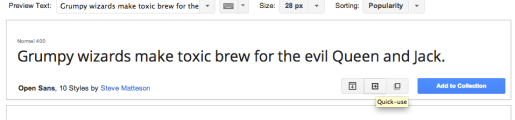
- After you click the “quick-use” button there will be some different options for how to import that font onto your website.
- I like to use the @import method. All you have to do is copy the code that they give you and paste it onto the top line of your CSS document.

- Your CSS should now look like this:
@import url(http://fonts.googleapis.com/css?family=Open+Sans);
- Once the code is pasted into your CSS you will be able to implement the font. You do this by writing:
p {

font-family: 'Open Sans', sans-serif;

}
- Above will set all your paragraphs to your new font!
- If you would like to read about how to choose a web font try this great post from Creative Bloq!
- To read more about web safe fonts and their history view “Web typography” on Wikipedia.
 She learns to code in Brooklyn